
Review
Gacha Nox felt less like starting a completely new game and more like opening a creator’s toolbox that had been expanded overnight. I a...

Gacha nox: Redefining Mobile Gaming with Immersive Features and Community Engagement
Gacha Nox felt less like starting a completely new game and more like opening a creator’s toolbox that had been expanded overnight. I already understood the basic Gacha Club workflow, so I did not need much time to learn where everything was. The difference appeared when I began scrolling through the customization menus and repeatedly found hairstyles, clothing pieces, facial details, accessories, backgrounds, and decorative elements that were not part of my usual character-building routine.
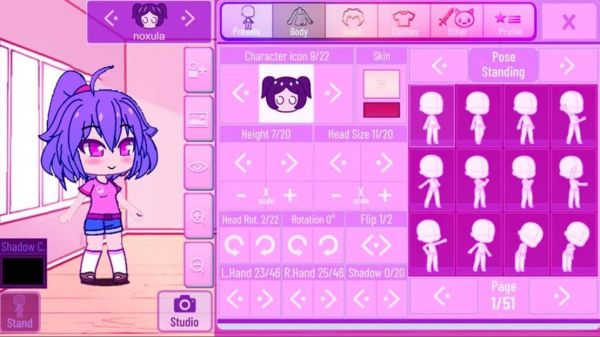
I approached Gacha Nox primarily as a character creator rather than a traditional game. My main goal was not to complete battles or chase progression. I wanted to design original characters, test unusual color combinations, prepare scenes, and see whether the additional assets could help my creations look less similar to standard Gacha presets. In that role, the mod gave me plenty to experiment with, although the experience also came with the uncertainty and rough edges I expect from unofficial fan-made software.
I Started With a Character I Had Already Made Before
Instead of creating a completely new idea, I tried rebuilding one of my older Gacha characters. This gave me a simple way to understand what Gacha Nox actually changed. I kept the same general color palette, personality, and visual theme, then replaced individual parts one by one.
The difference became obvious around the face and hair. Small additions allowed me to make the character look softer, sharper, older, more dramatic, or more stylized without changing the entire design. I could move away from the familiar combinations I had used repeatedly in Gacha Club and create a version that felt more specific.
Clothing had an even larger effect. Rather than selecting one recognizable outfit and adjusting its colors, I began combining pieces from different visual themes. Some items looked casual, some carried fantasy influences, and others worked better for darker or more decorative character designs.
The final character still looked like the person I had originally imagined, but the design no longer felt like a slightly edited preset. That first comparison convinced me that Gacha Nox was most useful when I already had a concept and wanted more visual tools to express it.
The Customization Menus Became My Main Gameplay Loop
My usual session followed a pattern that was closer to digital drawing than conventional gaming. I would begin with a rough character idea, test several combinations, decide that none of them matched, return to an earlier version, change the colors, and then accidentally create a completely different character.
I spent the most time adjusting:
- front and rear hairstyles;
- eye shapes and surrounding facial details;
- layered clothing combinations;
- sleeves, gloves, shoes, and smaller accessories;
- head decorations and fantasy elements;
- color shades for individual parts;
- poses and expressions prepared for scenes.
This process can absorb a surprising amount of time. A single accessory may seem insignificant, yet replacing it can change the entire direction of a design. I sometimes entered the editor planning to make a simple school character and left with a supernatural performer covered in decorative details.
Gacha Nox rewarded experimentation more than efficiency. I rarely created my favorite design on the first attempt. The stronger results appeared after I tried combinations that looked strange in isolation but worked once the complete outfit was visible.
Dark Designs Were Where the Mod Felt Most Comfortable
The visual identity of Gacha Nox suited characters with nocturnal, fantasy, gothic, futuristic, or mysterious themes. Many of the additional items seemed designed for people who enjoy darker palettes and more dramatic silhouettes.
I tested black, deep blue, muted purple, silver, and red combinations first. These colors worked naturally with the available accessories and layered clothing. It was easy to create characters who looked like magical fighters, supernatural students, performers, villains, or members of an imaginary fantasy organization.
That does not mean every creation needs to be dark. I also made softer pastel characters and bright casual designs. However, I had to search more carefully for combinations that maintained a clean and cheerful appearance. Some decorative pieces are visually busy, and using too many of them can overwhelm a lighter character concept.
The strongest approach for me was to choose one detailed focal point. I might use an elaborate hairstyle with simple clothing, or a layered outfit with restrained facial accessories. When I added complexity everywhere, the character stopped having a clear visual hierarchy.
My Character Looked Better After I Removed Half the Details
The large asset selection initially encouraged me to use everything. I added hair decorations, facial marks, layered sleeves, belts, unusual footwear, wings, and multiple accessories because each item looked interesting on its own.
The result was technically detailed but visually confusing. I could no longer tell which part of the design was supposed to attract attention. The colors competed with one another, the silhouette felt crowded, and the character’s personality became less obvious.
I eventually duplicated the concept in my notes and simplified it. I removed several accessories, limited the palette, and kept only the elements that supported the character’s role. The cleaner version looked more original because each remaining detail had a purpose.
This became one of my main lessons while using Gacha Nox: having more customization choices does not mean every choice belongs in the final design. The expanded library is most effective when I treat it as a source of options rather than a checklist.
I Built Characters Around Small Pieces of Story
Character creation became much easier when I stopped beginning with appearance. Instead, I wrote one or two sentences describing who the character was before opening the editor.
For one design, I imagined a quiet student who secretly repaired magical technology after school. That idea immediately suggested practical clothing, restrained colors, unusual gloves, and a small supernatural detail hidden beneath an otherwise ordinary appearance.
Another character was an overconfident stage performer who wanted every entrance to feel dramatic. For that design, brighter accents, exaggerated hair, decorative sleeves, and a confident pose made sense. The character could carry more visual detail because attention-seeking was part of the personality.
This story-first process helped me avoid random customization. Instead of asking whether an item looked attractive, I asked whether the character would choose to wear it. Gacha Nox gave me enough variety to support these decisions without forcing every concept into the same few styles.
Studio Mode Was Where the Characters Became Useful
Designing a character is satisfying, but I usually need a scene before the creation feels complete. Studio-style tools allowed me to place characters into backgrounds, adjust their poses, change expressions, and begin shaping a visual story.
My first scenes were simple. I placed two characters together, gave them opposing expressions, and created the impression of a disagreement. Even without dialogue, posture and spacing communicated part of the relationship.
After that, I experimented with more deliberate compositions. A character positioned near the edge of the frame appeared distant or excluded. Two characters placed too close together created a more intense interaction. A slightly tilted pose could make someone look nervous, energetic, or unstable depending on the expression.
The backgrounds gave me a foundation, but they did not automatically create atmosphere. I still needed to match the character colors and poses to the location. A highly detailed outfit could disappear against a busy scene, while a simpler design often remained easier to read.
How I Prepared a Scene
- I decided what had happened immediately before the image;
- I selected the character who controlled the emotional focus;
- I chose expressions before finalizing poses;
- I adjusted spacing to show the relationship between characters;
- I checked whether the background distracted from the designs;
- I simplified any outfit details that became unclear at scene size.
This approach made the studio feel less like a sticker board and more like a lightweight storytelling system. The tools were simple, but the creative decisions could become surprisingly detailed.
Poses Changed More Than the Outfits
I initially believed that clothing would define most of a character’s personality. After making several scenes, I realized that pose selection could completely change how the same design was perceived.
A dark outfit paired with a relaxed pose looked calm and confident. The same outfit with tense arms, a lowered head, and an uncertain expression created a much more vulnerable character. Nothing about the costume had changed, yet the story suggested by the image was different.
I began testing multiple poses before deciding that a character was finished. This revealed problems that were not visible in the neutral editor stance. Some accessories overlapped awkwardly, certain sleeves hid the hands, and layered clothing could become difficult to read at particular angles.
Correcting those issues took time, but it improved the final scenes. I stopped thinking of the character as one static front-facing image and started considering how the design would function across several emotional moments.
Color Matching Required More Patience Than Expected
The ability to recolor individual elements gave me freedom, but it also created endless opportunities to make poor decisions. Two shades that looked nearly identical in separate menus could appear noticeably different once placed beside each other.
I often selected a main color, a secondary color, and one accent before editing the outfit. Without that limitation, I would keep adding shades until the character looked disconnected. Using a small palette made complex outfits easier to control.
Dark clothing required particular attention because separate black or gray pieces could lose their boundaries. I used subtle differences in brightness to keep jackets, belts, sleeves, and trousers visually distinct. For lighter characters, I relied on stronger accents to prevent the design from looking washed out.
Hair and eye colors also affected the balance. When both were extremely saturated, they competed for attention. I usually kept one vivid and made the other more restrained. These were not rules imposed by Gacha Nox, but the expanded customization options made color discipline more important.
Making a Group Was Harder Than Making One Character
Individual character design gave me complete freedom. Creating a believable group introduced another problem: every member needed a unique identity while still looking as though they belonged in the same world.
I experimented with a fictional team of four characters. At first, each person had a completely different palette and clothing style. They looked interesting separately, but together they resembled characters imported from unrelated stories.
I revised the group by introducing shared visual rules. Every member received one repeated accent color, a similar accessory category, and clothing that suggested the same general setting. Their hairstyles, expressions, body details, and primary colors remained different.
This created cohesion without making them identical. One character looked disciplined, another playful, another secretive, and another openly rebellious, but I could still believe that they attended the same academy or belonged to the same organization.
Gacha Nox worked especially well for this kind of project because I had enough related items to create variations on a theme. I did not need to reuse the exact same outfit to communicate a connection.
The Interface Was Familiar, but Not Always Smooth
Because Gacha Nox builds on a familiar Gacha-style structure, I understood most menus quickly. Categories were recognizable, character slots behaved as expected, and I could move between editing and scene creation without relearning the entire workflow.
The challenge came from the volume of options. More items meant more scrolling, and I occasionally forgot where I had found a particular accessory. When I returned to recreate a design, locating the same piece could take longer than expected.
Some assets also felt better integrated than others. A number of additions matched the surrounding art style naturally, while others seemed noticeably more detailed or visually different. Whether this bothered me depended on the character. A mixed style could work for a fantasy design but look inconsistent in a simple everyday outfit.
I also treated saving carefully. With unofficial mods, I do not assume that every version or device will behave perfectly. I kept records of important character settings and captured completed designs so that a technical issue would not erase the only copy of my work.
I Did Not Use the Battle Features Very Often
Gacha-style games may include combat and progression systems, but those were not the main reason I spent time with Gacha Nox. I explored them briefly, yet I repeatedly returned to character creation and studio work.
The battle side can provide a change of pace, especially when I want to see familiar characters doing something other than standing in a scene. However, the customization tools offered more lasting value for me. A battle gave me a short activity, while a successful character could become part of a larger story, video, profile image, or series of edits.
This does not necessarily mean the gameplay systems have no purpose. They help the package feel more interactive, and some players may enjoy developing teams alongside their creative work. In my sessions, though, they functioned as an occasional extra rather than the central attraction.
What Kept Me Editing After the Character Was Finished
I rarely considered a character truly complete after the first version. Once I placed the design into scenes, I noticed details that needed adjustment. A hairstyle covered an important accessory. An eye color disappeared against the skin tone. A sleeve made the arm position difficult to understand.
I began creating several versions of important characters:
- an everyday outfit;
- a formal or performance outfit;
- a simplified design for crowded scenes;
- an alternate emotional expression set;
- a damaged or transformed version for story moments.
This variation made the characters feel more flexible. They were no longer single images built around one pose. I could use them across different scenes without pretending that they always wore the same elaborate outfit.
Gacha Nox supported this process because the asset library encouraged visual continuity. I could keep the character’s identity while changing the context through clothing, accessories, and expressions.
Originality Still Required Work
Access to more items did not automatically make my designs unique. Popular hairstyles, clothing pieces, and color combinations can become just as recognizable as standard Gacha Club assets when many creators use them in similar ways.
I found that originality came from combining several smaller decisions. The backstory influenced the palette. The palette influenced the clothing. The clothing affected the pose, and the pose determined which accessories remained visible. No single asset carried the complete design.
I also tried avoiding the temptation to copy characters I had seen online. Reference images were useful for studying themes, but direct imitation removed most of the creative satisfaction. My favorite results came from starting with a broad influence and then changing the concept until it served my own story.
The mod provides materials. It does not replace the need for composition, restraint, and imagination.
The Unofficial Status Changed How I Approached It
Gacha Nox is associated with the fan-made mod scene rather than a normal official game release. That matters because unofficial downloads can be confusing, outdated, modified by third parties, or presented on sites that are not connected to the original creator.
I would not install a random file simply because a page used the Gacha Nox name. Different apps and reuploads may describe themselves in similar ways while offering a different experience. I would check the source carefully, avoid suspicious installers, and keep expectations realistic about updates and technical support.
This uncertainty also affected how much work I stored inside the software. I treated screenshots, exported ideas, and written character settings as backups. Creative projects can take hours, and I did not want access to one unofficial installation to become the only way to preserve them.
My Favorite Session Never Became a Finished Story
The most enjoyable time I spent in Gacha Nox began with no plan for a complete project. I created two characters who looked as though they belonged to rival groups, placed them in a nighttime setting, and started testing expressions.
One character appeared confident in the editor, but a slightly lowered pose made the same expression look defensive. The second character originally looked hostile, yet changing the eyes created the impression that the anger was hiding concern.
I added a third person in the background, adjusted the spacing, and suddenly the scene suggested a secret meeting that had been interrupted. Nothing in the software wrote that story for me. It emerged through the visual choices.
I never turned the scene into a complete comic or video. Even so, it showed me why I enjoyed the mod. The tools could transform an unfinished idea into a moment that implied relationships, history, and conflict.
Why Gacha Nox Stayed in My Creative Rotation
I would not describe Gacha Nox as a deep role-playing game or a replacement for professional illustration software. Its strongest role is much more specific: it gives Gacha-style creators a larger collection of parts for building characters and arranging visual stories.
I returned because the editor made it easy to test ideas quickly. I did not need to draw every hairstyle or outfit from the beginning. I could assemble a concept, evaluate whether it worked, and revise it before investing more time in an edit or story.
The additional assets helped me escape some of my repetitive design habits, but they also challenged me to make better choices. More detail could improve a character or bury the original idea beneath decoration. More colors could create personality or destroy cohesion. More options increased freedom, not guaranteed quality.
My best Gacha Nox creations came from slowing down, deciding who the character was, and using only the elements that supported that identity. When I approached it this way, the mod became more than a collection of extra clothes and hairstyles. It became a fast visual brainstorming space where I could turn a small piece of imagination into a character ready for a much larger story.
Pros:
- Intuitive, modern user interface that simplifies navigation
- Seamless cross-platform performance across Android, iOS, and Chromebooks
- Regular updates and new features that keep the experience fresh
- Robust security measures and data protection
- Active community engagement and social media integration enhances the overall experience
- Immersive and engaging gameplay with dynamic outcomes
Cons:
- Occasional performance lags in restricted network environments
- Limited availability on non-mobile platforms may restrict access for some users
- Reliance on in-app purchases can sometimes impact the balance of gameplay









Recent Reviews

Minecraft

Grand Theft Auto V

Toca Boca World

Roblox

Leave a comment
Your comment is awaiting moderation. We save your draft here
0 Comments