
Review
Lossless Scaling is one of the rare gaming utilities that noticeably changed how I use older games, demanding releases, emulators, and...
Innovative Integration: Exploring the Dynamic Realm of Lossless Scaling
Lossless Scaling is one of the rare gaming utilities that noticeably changed how I use older games, demanding releases, emulators, and titles with limited display options. It does not replace a stronger graphics card, repair poor optimization, or magically turn an unstable game into a perfectly responsive experience. What it can do is make a controlled base frame rate look significantly smoother, scale a lower-resolution image to fit my screen more cleanly, and provide options that many games never received from their developers. Once I understood those limits, the application became far more useful than its compact interface initially suggested.
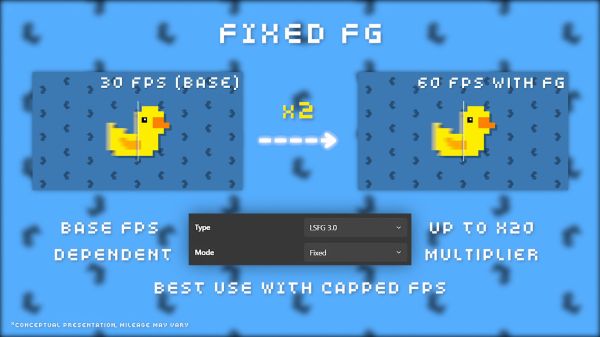
I first approached Lossless Scaling as a simple upscaling tool because the name makes that function sound like the entire product. In practice, frame generation became the feature I used most often, especially in games capped at 30 or 60 frames per second. The application captures the game’s output, processes it externally, and inserts generated frames between the original ones. This can make camera movement and animation appear much smoother, although the underlying responsiveness still depends on the real frame rate produced by the game.
From my perspective as a gamer, Lossless Scaling feels like a graphics setting that exists outside the game and therefore remains available when the developer provides no suitable alternative. That independence is its greatest advantage, but it also creates more variables than enabling a native option inside a modern title. Display mode, frame caps, refresh rate, GPU headroom, synchronization, overlays, and game-specific behavior can all affect the result. The software rewards experimentation, and the best configuration for one game may be completely wrong for another.
My First Setup Was Not the Correct Setup
I initially launched a game, enabled frame generation, and expected instant perfection without changing anything else. The image looked smoother, but the frame pacing was uneven and the controls felt heavier than I wanted. I soon realized that Lossless Scaling works best when the original game already provides a stable foundation. A fluctuating base frame rate gives the application inconsistent information, so the generated output can inherit or exaggerate those problems.
Locking the game to a stable frame rate produced a much better result than allowing it to jump constantly between different values. A consistent 30 frames per second can sometimes feel more convincing after generation than a base rate moving unpredictably between 35 and 55. This does not mean lower is always better; it means consistency matters. Lossless Scaling can create additional visual frames, but it cannot transform unstable timing into genuine native performance.
Frame Generation Changes Motion, Not the Original Game Logic
The most important lesson I learned is that generated frames improve visual smoothness without increasing the rate at which the game processes input. If the title is running at 30 real frames per second, the controls still behave much closer to a 30-frame experience even when the screen appears to show a much higher output. Mouse movement, camera response, and fast actions therefore may not feel as smooth as the image looks. This difference is especially noticeable in competitive games or titles requiring rapid aiming.
For slower single-player experiences, the compromise can be much easier to accept. Strategy games, role-playing titles, third-person adventures, driving games, and emulators often benefit strongly because I care more about clean motion than minimum latency. When I tried the same setup in fast multiplayer shooters, the visual improvement could not fully compensate for the heavier response. Lossless Scaling is most convincing when the game’s pace matches the limitations of interpolated frames.
A Stable Base Rate Is the Real Entry Requirement
Lossless Scaling does not need the highest possible base frame rate, but it needs one the hardware can maintain. I usually begin by finding a realistic performance target without frame generation, then lowering a few demanding settings until the frame-time graph becomes steady. Only after that do I apply a cap and activate LSFG. This order gives me a far better result than using frame generation as the first response to severe performance problems.
A game struggling below its chosen cap may display obvious stutter even after additional frames are inserted. Generated motion cannot hide every interruption because the application still depends on the original sequence. I found that reducing shadows, volumetric effects, ray tracing, or resolution often improves the final image more than selecting an aggressive generation multiplier immediately. Building a clean base remains the most important part of the process.
The Refresh Rate Determines Which Targets Make Sense
Monitor refresh rate has a large influence on the frame cap and multiplier I select. On a 60 Hz display, a stable 30-frame base paired with a doubling mode is an obvious starting point. Higher-refresh monitors offer more combinations, such as targeting 40 real frames for an output near 120 or using another balanced division of the available refresh range. The exact choice depends on whether I prioritize responsiveness, visual smoothness, image quality, or lower GPU demand.
I avoid choosing a multiplier only because the final number looks impressive. Generating many frames from a weak base creates a smoother counter without necessarily producing convincing motion. The distance between original frames becomes larger, giving the algorithm less reliable information about what happens between them. In my experience, a moderate multiplier with a stronger base often looks cleaner than an extreme multiplier built on very low native performance.
LSFG Is Most Impressive in Games With Fixed Frame Caps
Older console ports and emulated games can benefit enormously because many of them are locked to 30 or 60 frames per second for technical reasons. Their internal logic may not support a higher native frame rate, and unofficial modifications can introduce animation, physics, or timing problems. Lossless Scaling leaves the game’s original logic untouched while making the displayed motion appear smoother. This allows me to preserve compatibility without accepting the visual judder of the original cap.
I found this especially useful in third-person games where slow camera panning makes a low frame rate obvious. The generated output makes environmental movement and character animation easier on my eyes, even though controls remain tied to the original rate. It does not feel identical to a proper high-frame-rate patch, but it can be a substantial improvement when no patch exists. The application gives neglected releases a new presentation layer without modifying their files.
Emulation Became One of My Favorite Use Cases
Emulators often reproduce systems whose games were designed around strict timing rules. Increasing the internal frame rate may accelerate gameplay or disrupt logic, while keeping the original limit preserves accuracy but leaves motion looking dated on a modern display. Lossless Scaling provides a practical middle path by generating frames after the emulator has produced the correct output. The game continues running at its intended speed while the final presentation becomes smoother.
The results depend heavily on the visual style and camera behavior. Games with clean edges, stable movement, and limited interface changes can look remarkably convincing. Rapid scene transitions, heavy particle effects, or constantly changing two-dimensional artwork may expose artifacts more clearly. Even so, I found emulation to be one of the areas where the utility feels less like a compromise and more like a genuine enhancement.
Scaling and Frame Generation Solve Different Problems
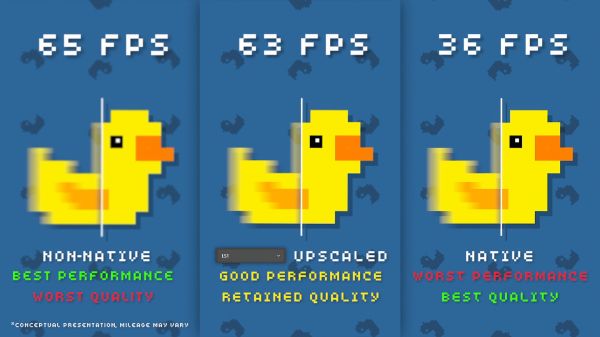
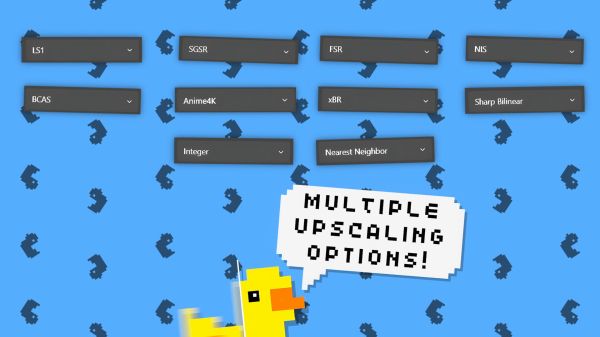
Lossless Scaling can be used for image scaling, frame generation, or both, but these features should not be treated as interchangeable. Scaling takes a lower-resolution image and enlarges it to fit the display while attempting to preserve clarity. Frame generation inserts additional images between existing frames to improve perceived motion. One addresses spatial resolution, while the other addresses temporal smoothness.
I sometimes use frame generation at native resolution with scaling disabled because the game already looks sharp enough. In other cases, I lower the internal resolution to create more GPU headroom, then use a scaling algorithm to recover presentation quality before enabling generation. Combining both can make a demanding title far easier to run, but every processing step introduces another possible compromise. I prefer adding only the features required for the specific game.
Lowering Resolution Can Create the Headroom LSFG Needs
Frame generation consumes GPU resources, so activating it on a graphics card already operating at its limit may reduce the original frame rate. This creates a frustrating loop where the tool generates additional frames while weakening the base sequence needed to produce them. Lowering the game’s resolution or a few expensive settings can free enough capacity for LSFG to operate more consistently. The final image may look smoother and more stable even though the internal render is technically less demanding.
This trade is particularly useful on older or mid-range hardware. Instead of forcing native resolution at an unstable frame rate, I can target a lower but stable base and allow Lossless Scaling to improve both size and motion. The quality of the result depends on the game’s art style, interface, and resolution. Text-heavy titles may reveal scaling compromises more clearly than games focused on large three-dimensional environments.
The Application Does Not Produce Free Performance
The on-screen counter can create the impression that Lossless Scaling has multiplied the graphics card’s real rendering capability. In reality, the generated frames require processing and do not contain the same complete information as native frames calculated by the game engine. The software is creating a more fluid visual sequence from existing output rather than making the engine simulate the world more frequently. This distinction matters when evaluating both image quality and latency.
I think of the utility as a presentation enhancer rather than a direct performance upgrade. It can make limited hardware feel more comfortable, especially when the base rate is stable, but the original system still determines responsiveness, simulation frequency, and asset quality. The benefit is real, yet it belongs to a different category than installing a faster GPU. Keeping that expectation realistic prevented disappointment.
Artifacts Are Easiest to See Around Fast Objects
Generated frames must predict where objects will appear between two real frames, and that prediction is not always correct. Rapid movement, thin geometry, weapon sights, particles, transparent effects, and objects crossing one another can create distortion. I noticed the most obvious artifacts around character outlines, foliage, interface elements, and the edges of the screen during fast camera rotation. These errors usually last only a fraction of a second, but once I begin searching for them, they become easier to notice.
Whether they are distracting depends on the game and my attention. During relaxed exploration, I often stop noticing minor visual errors because the improved motion is more valuable. During competitive aiming or scenes with dense interface elements, the artifacts become harder to ignore. Lossless Scaling works best when I judge the complete experience rather than pausing footage to inspect every generated frame.
User Interfaces Can Reveal the Trick
Static interface elements create a special challenge because the algorithm must separate them from the moving world behind them. Health bars, crosshairs, subtitles, maps, inventory panels, and damage numbers may become distorted when the scene changes quickly. Modern versions of LSFG handle many interface situations better than earlier builds, but no external frame generator understands every game perfectly. Titles with busy overlays remain more likely to expose errors.
I sometimes reduce unnecessary interface elements when a game allows customization. Hiding floating damage numbers, motion-heavy overlays, or large transparent panels can improve the final result noticeably. Another option is accepting frame generation only during regular gameplay and disabling it for interface-heavy tasks. The application is flexible enough that I do not need to force one configuration across every scene.
Camera Motion Determines How Convincing It Feels
Smooth, predictable camera movement gives the algorithm strong information for creating intermediate frames. Slow panning in an adventure game can look excellent, especially when the base frame rate is consistent. Sudden flicks, rapid turning, and irregular first-person movement are much more difficult. The generated sequence may appear smooth while individual objects briefly deform or leave unstable edges.
Controller-based games often gave me better results than mouse-driven ones because analog camera movement is naturally more gradual. This does not mean Lossless Scaling cannot work with a mouse, but aggressive sensitivity makes artifacts more visible. Reducing unnecessary camera acceleration and maintaining stable motion can help. The best visual experience often comes from matching the control style to what frame interpolation handles comfortably.
Latency Is the Main Price of Smoother Motion
Frame generation needs completed frames before it can create intermediate ones, so additional processing inevitably affects responsiveness. The amount varies according to the base rate, synchronization settings, GPU load, and selected generation mode. At higher real frame rates, the extra delay can feel less severe because the original input cycle is already fast. At a very low base, the controls may remain noticeably heavy even when motion appears fluid.
I found the latency acceptable in many single-player games but distracting in competitive titles. Turn-based games, cinematic adventures, platformers with predictable timing, and slower racing experiences are easier to enjoy with the compromise. Rhythm games, precision shooters, and demanding online matches expose it quickly. Lossless Scaling is not a universal setting I enable without considering the genre.
A Higher Displayed Number Does Not Guarantee Better Control
Seeing an output counter rise from 30 to 60, 90, or beyond can be satisfying, but that number describes presented frames rather than original game updates. The controls cannot become as responsive as true native output at the same displayed rate. This is the most common misunderstanding surrounding external frame generation. Visual smoothness and input response improve through different mechanisms and should be evaluated separately.
I test a configuration by moving the camera, navigating menus, and performing a few actions requiring timing rather than relying only on the counter. If the game looks fluid but feels unpleasant, I lower the multiplier or increase the base rate. Sometimes the best result is fewer generated frames with better control. The goal is a balanced experience, not the largest possible number.
Borderless and Windowed Modes Are Part of the Workflow
Lossless Scaling generally works by capturing a windowed or borderless game and presenting the processed image across the display. This means display mode becomes part of the setup rather than an insignificant menu option. Some games behave perfectly in borderless mode, while others have unusual frame caps, synchronization rules, or focus problems. I usually test these conditions before changing advanced Lossless Scaling settings.
Exclusive fullscreen titles may require switching modes before the utility can interact with them correctly. Older games sometimes provide only awkward window sizes or unusual aspect ratios, making the scaling feature particularly valuable. The application can transform a small fixed window into a much more usable full-screen presentation. This remains one of its practical strengths even without frame generation.
Older PC Games Gain a Better Full-Screen Option
Many classic PC releases were designed for resolutions and aspect ratios that no longer match modern monitors. Running them directly at full screen can stretch the image, introduce blur, or create compatibility problems. Lossless Scaling allows me to keep a stable windowed output and enlarge it using a selected algorithm. This avoids modifying the game and can preserve the intended geometry more accurately.
Pixel-art games benefit when the scaling mode respects sharp edges and integer relationships. Three-dimensional titles may look better with a different filter that reduces rough edges or reconstructs detail. The availability of several algorithms allows the application to serve very different visual styles. I rarely use one scaling method for every game because the correct choice depends on the source image.
Pixel Art Requires a Different Approach
Traditional smoothing can damage pixel art by turning clear blocks into blurry shapes. For these games, I prefer scaling options that preserve hard edges and avoid inventing soft transitions. The correct configuration can make a small retro window fill a modern display while retaining the intended visual character. This is useful for games that do not provide good internal scaling controls.
Integer scaling is ideal when the source resolution fits the display through a whole-number multiplier, although it may leave unused borders. Stretching beyond that relationship can fill more of the screen but introduce uneven pixels. Lossless Scaling gives me enough control to decide which compromise looks better. The application is valuable precisely because it does not assume every game should be processed like a modern three-dimensional title.
Anime and Illustrated Games Can Look Surprisingly Clean
Games with strong outlines, flat colors, and animated visual styles often respond well to careful scaling. A lower internal resolution can remain visually attractive once enlarged, especially when interface text is rendered separately or already clear. Frame generation may also work well when character movement is readable and camera motion remains controlled. These games sometimes produce better results than highly realistic scenes filled with transparent particles and fine geometry.
The main risk comes from interface-heavy presentation and rapid two-dimensional transitions. Dialogue boxes, portraits, and visual-novel elements may not benefit from frame generation at all. I usually disable unnecessary generation for games dominated by static scenes. Scaling alone can still improve compatibility without adding processing that provides little visible benefit.
Side-Scrolling Games Expose Different Strengths
Side-scrolling movement is often predictable, giving LSFG a strong basis for estimating intermediate positions. Background layers move consistently, characters follow readable trajectories, and the camera may pan at a steady speed. This can make 30-frame games look much smoother on modern displays. I found the improvement particularly noticeable during continuous horizontal travel.
However, fast sprite animation and sudden effects can produce duplicated outlines or temporary distortion. Precision platformers also depend heavily on response, so the visual gain may not justify additional latency. I evaluate these games individually rather than assuming the side-scrolling format guarantees a perfect result. Slower exploration titles usually benefit more than games built around exact reaction windows.
Racing Games Can Benefit When the Base Rate Is Already Playable
Racing games create constant forward motion, making frame-rate limitations highly visible in scenery and trackside objects. A stable base rate paired with LSFG can make speed feel more convincing and reduce visible judder during turns. Controller input also tends to be smoother than rapid mouse movement, which helps the generated image remain stable. I enjoyed the result most in single-player races where a small latency increase was manageable.
A poor base rate still produces weak steering response, regardless of how smooth the track appears. Competitive racing and precise time-trial play therefore demand caution. I would rather use a stable native 60 than generated 120 from a base that feels too slow. Lossless Scaling improves visual flow but cannot replace the connection between steering input and simulation timing.
Strategy Games Are a Comfortable Match
Many strategy titles place more pressure on the processor than the graphics card, creating situations where the game cannot reach a high native frame rate even with visual settings reduced. Lossless Scaling can make camera movement and map scrolling appear smoother without requiring changes to simulation speed. Input latency is less damaging because actions are rarely measured in milliseconds. This makes strategy games one of the easiest genres for me to recommend testing.
The interface can create artifacts, especially when unit labels, icons, and tooltips move across the map. However, slow camera motion and predictable animation often keep those errors manageable. I value smoother scrolling more than perfect reconstruction of every small icon. The application makes large maps feel more pleasant to navigate even when the engine remains limited.
Simulation Games Benefit for Similar Reasons
Large simulation games often become CPU-limited as cities, populations, vehicles, or systems grow more complex. A stronger GPU cannot always raise the original frame rate because the processor or game logic sets the limit. LSFG can improve the visual presentation while leaving the simulation frequency unchanged. This is useful when the base rate remains stable enough for comfortable control.
I used it most successfully in games where I spend time observing rather than reacting rapidly. Smooth vehicle movement and camera panning make a busy simulation easier to watch. Interface artifacts may still appear, but the slower interaction reduces their impact. Lossless Scaling does not solve simulation bottlenecks, yet it can make their visual consequences less distracting.
Competitive Games Are the Weakest Recommendation
Online competitive games reward low latency, reliable frame timing, and precise visual information. External frame generation adds processing and may create artifacts around fast enemies, crosshairs, or interface elements. Even when the output looks smoother, the control response may place me at a disadvantage. I generally prefer lowering visual settings and maximizing real frames instead.
There may be casual situations where a player accepts the compromise, especially in slower competitive genres. However, I would not treat Lossless Scaling as a substitute for native performance in a serious ranked environment. The technology is strongest when visual comfort matters more than minimum response time. Understanding when not to use it is part of using it well.
Adaptive Frame Generation Makes Variable Games Easier to Manage
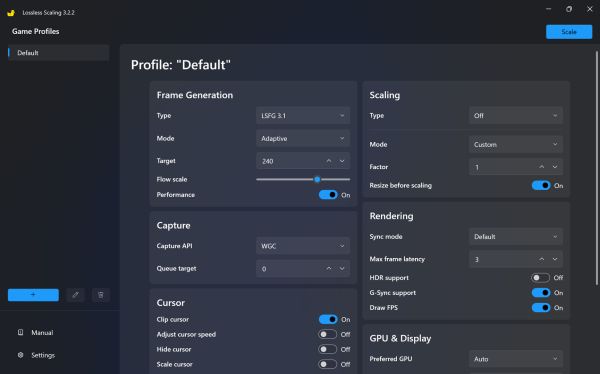
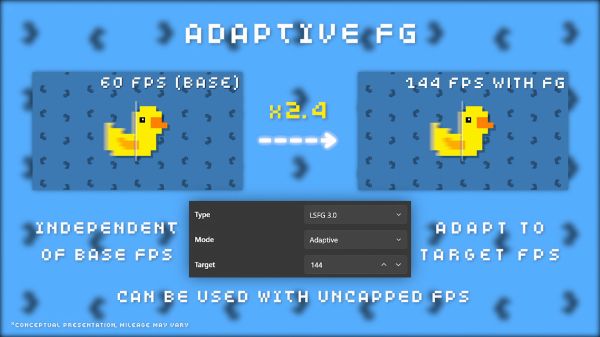
Adaptive generation is useful for games that cannot maintain one perfectly fixed multiplier relationship throughout every scene. Instead of depending only on a rigid output target, the application can adjust generation behavior around a selected frame-rate goal. This can reduce the need to build one exact configuration for a title whose performance changes between interiors, open areas, and combat. I still prefer a stable base, but adaptive behavior makes variation less disruptive.
The feature does not eliminate the consequences of severe drops. If the real frame rate collapses, responsiveness and image quality will still suffer. What it can do is make moderate fluctuations feel less obvious and preserve a more consistent visual result. I see it as a convenience layer rather than a replacement for optimization. The game still needs enough performance to provide usable source frames.
Resolution Scale Can Reduce the Cost of Generation
Lossless Scaling can reduce the resolution used internally for motion analysis, decreasing the amount of work required from the GPU. This is separate from scaling the game image itself and mainly affects the resources consumed by frame generation. Lower values can improve performance on limited hardware, although the algorithm receives less information for estimating movement. The result may introduce more artifacts or weaker detail around complex motion.
I use this option when LSFG consumes enough GPU time to damage the original frame rate. Reducing the processing scale can restore the stable base needed for a better overall result. The correct value depends on the title and available GPU headroom. It is another example of Lossless Scaling asking me to balance quality, cost, and stability rather than offering one universally correct switch.
Dual-GPU Use Can Give Older Systems an Interesting Option
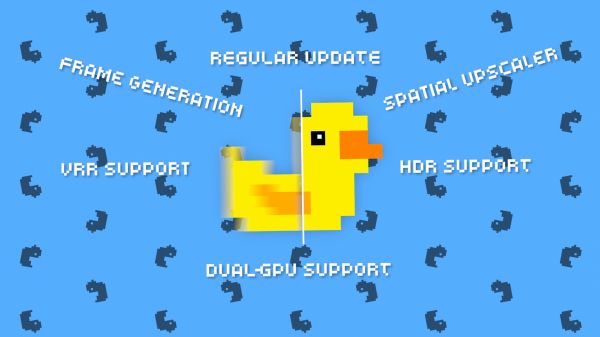
Systems containing both integrated and dedicated graphics may provide another configuration path. One GPU can render the game while another handles Lossless Scaling, potentially reducing competition for the same resources. The effectiveness depends on hardware, display connections, drivers, memory transfer, and system design. It is not automatically faster simply because two graphics processors are present.
I like that the application provides options for unusual hardware combinations rather than assuming every user has one powerful modern GPU. Testing is essential because an integrated chip may be too slow or data transfer may introduce other limitations. When it works well, this approach can preserve more headroom for the game. It turns hardware that would otherwise remain mostly unused into part of the presentation pipeline.
The Interface Is Simple Until I Understand the Options
The main window appears compact, but each selection can affect the final experience significantly. Scaling type, scaling mode, frame generation model, multiplier, capture method, synchronization, and performance options interact with the game’s own settings. At first, this made the application feel more complicated than expected. After creating several reliable configurations, the workflow became much faster.
I appreciate that the utility does not surround its features with unnecessary launcher systems or cosmetic menus. Most controls exist because they change behavior. However, clearer built-in explanations and stronger game-specific guidance would help new users avoid poor first impressions. Lossless Scaling is easy to activate but not always easy to optimize.
The Hotkey Makes Experimentation Convenient
Activating the configured process through a shortcut allows me to test changes without rebuilding the entire setup. I can launch a game in borderless mode, apply the frame cap, and trigger Lossless Scaling when the scene is ready. This makes comparisons straightforward because I can observe motion before and after activation. The quick workflow encourages game-by-game adjustment.
I occasionally encountered situations where focus, overlays, or another window interfered with capture. Returning to the game window and repeating the activation usually resolved the issue. The process is not as seamless as a native graphics option because another application is involved. Still, the hotkey keeps the extra step small enough that I do not mind using it regularly.
Overlays Can Create Unexpected Problems
Performance monitors, recording tools, platform overlays, chat windows, and hardware utilities may interact with capture or frame presentation. Some combinations work perfectly, while others introduce flicker, incorrect detection, or visual artifacts. When a game behaves strangely, I disable unnecessary overlays before assuming Lossless Scaling itself has failed. Reducing the number of active layers often solves the problem.
This troubleshooting process can be frustrating because the utility operates within a complex Windows display environment. The same configuration may work in one title and behave differently in another. I learned to change one variable at a time rather than adjusting several settings simultaneously. A methodical approach saves more time than copying a large configuration without understanding it.
Frame Caps Need to Be Reliable
A good limiter is essential because the entire generated sequence depends on consistent source timing. Some games provide excellent internal caps, while others create uneven pacing despite displaying the correct average number. External tools or driver-level caps may produce better results in those cases. I choose whichever method gives the smoothest real frame-time behavior before LSFG is active.
Looking only at average frames per second can hide the problem. A game may report 40 while alternating between short and long frames, creating visible instability. Lossless Scaling cannot fully correct that rhythm because the original timing remains irregular. Consistency at the source is more valuable than a slightly higher average.
V-Sync and Variable Refresh Need Careful Testing
Synchronization settings determine how generated frames reach the display, and poor combinations can create tearing, stutter, or unnecessary latency. The ideal setup varies according to monitor support, selected capture mode, frame cap, and game behavior. I avoid assuming that the setting I use for native gaming will automatically remain correct with LSFG. Testing camera movement provides a quick indication of whether presentation is stable.
Variable refresh displays can make lower base rates easier to tolerate, but generated output still needs to fit the monitor’s operating range sensibly. Excessive synchronization layers may increase latency, while disabling everything can create visible tearing. The correct balance is often hardware-specific. Lossless Scaling gives me control, but that control comes with responsibility for understanding the display chain.
Steam Deck and Non-Windows Expectations Need Caution
Lossless Scaling is primarily designed as a Windows application, and its normal workflow depends on Windows capture and presentation behavior. Players should not assume that every handheld operating system or compatibility layer will support the same features cleanly. Windows-based handheld PCs are a more natural fit, although performance overhead and screen refresh still matter. The utility’s value on portable hardware depends heavily on power limits and available GPU headroom.
A handheld running a game at a stable lower rate can be an appealing scenario because the smaller screen may hide some image artifacts. However, battery use and thermal limits become additional concerns. Generating frames requires processing power even when the displayed result appears more efficient. Smoothness may improve while energy consumption increases, so the best setting is not always the most aggressive one.
Video Playback Is an Interesting Secondary Use
Lossless Scaling can also process video content displayed through compatible windows, allowing old footage or animation to appear smoother or fill the screen differently. This is not the main reason I use the application, but it demonstrates how independent the technology is from game engines. The utility sees presented frames and attempts to transform them regardless of whether they came from a game, emulator, or video player. The result varies according to motion and source quality.
Frame interpolation in films and animation is a matter of personal taste. Some viewers enjoy the smoother appearance, while others prefer the original cadence and artistic timing. I use it selectively rather than applying it to everything. The application provides the option without deciding that smoother is automatically more authentic.
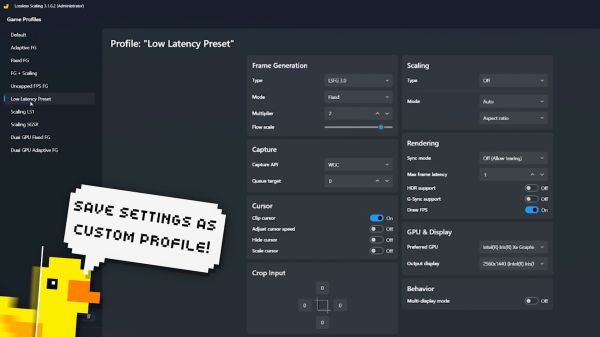
Profiles Would Make Regular Use Easier
Different games often require different caps, multipliers, scaling algorithms, and performance options. Recreating these settings manually can become inconvenient once I use the utility across a large library. A strong profile system with automatic detection would make Lossless Scaling feel more integrated into daily gaming. I would like to launch a title and have the preferred configuration load without additional adjustment.
The current workflow remains manageable because the interface is compact, but frequent users naturally build several mental presets. Older games may need scaling only, emulators may need a conservative generation mode, and demanding modern titles may require a reduced processing scale. Saving these combinations more visibly would reduce mistakes. The software’s flexibility creates the need for better organization.
The Price Makes Experimentation Easier to Justify
Lossless Scaling is inexpensive compared with upgrading major PC hardware or purchasing premium editions built around proprietary graphics features. That does not mean it offers equivalent results, but the low entry cost makes the limitations easier to accept. I received enough practical value from older games and emulators alone to justify keeping it installed. The application serves a broad library rather than one release.
Its value depends on willingness to configure it. Someone expecting one universal button may use it briefly and decide the artifacts or latency are unacceptable. A player comfortable testing caps, settings, and game genres will discover far more suitable use cases. The software is affordable, but the real investment is attention.
It Can Extend Hardware Life Without Replacing an Upgrade
On aging hardware, Lossless Scaling can make certain games feel more comfortable by combining lower internal settings with scaling and frame generation. This is particularly useful when the system can maintain a modest stable base but cannot reach the monitor’s preferred refresh rate natively. The visual result may make postponing an upgrade easier. However, severely underpowered hardware will still struggle because the application needs resources of its own.
I would not purchase it expecting every new release to become playable. Minimum frame-rate requirements, memory limitations, processor bottlenecks, and shader stutter remain outside its control. It is best viewed as an optimization tool operating after the game has already reached a usable state. When that condition is met, the improvement can be substantial.
Native Frame Generation Usually Has Better Information
Frame generation integrated directly into a game engine can access motion vectors, depth, interface separation, and other data unavailable to an external application. This usually allows native technologies to produce cleaner results and manage interfaces more intelligently. Lossless Scaling works from the final presented image, which makes its broad compatibility possible but limits what it can understand. I do not expect it to outperform a well-implemented internal solution in every category.
Its advantage is availability. Native frame generation exists only in supported games and may require specific hardware. Lossless Scaling can attempt the process across a far wider range of software and graphics cards. I use native options when they work well and turn to LSFG when the game offers nothing comparable or when I prefer its flexibility.
It Is Especially Valuable for Abandoned Games
Some titles will never receive modern patches, updated renderers, or improved display settings. Their developers may have moved on, studios may have closed, or technical limitations may make official changes unlikely. Lossless Scaling gives these games access to presentation improvements without waiting for support that may never arrive. This is where the utility feels most valuable to me.
A modern blockbuster with built-in scaling and frame generation has several options already. A forgotten port locked to a small window or low frame rate has none. Applying external scaling or generated motion can make that older title far easier to revisit. The application acts like a compatibility enhancement for an entire library.
It Encourages Me to Reconsider Performance Targets
Before using Lossless Scaling, I often viewed native 60 frames per second as the minimum acceptable target for every game. The utility taught me to separate responsiveness from visual smoothness more carefully. A stable 40-frame base with generated output can sometimes provide a better single-player experience than an unstable attempt to reach 60. The correct target depends on the title rather than one universal number.
This does not make native performance unimportant. Higher real rates still provide better control and stronger source information. However, the choice is no longer limited to lowering every setting or accepting visibly rough motion. Lossless Scaling adds another compromise that can be worthwhile when used intentionally.
My Most Reliable Configuration Process
I begin by running the game without Lossless Scaling and identifying a frame rate the hardware can maintain during demanding scenes. I then apply a reliable cap, choose borderless or windowed mode, and verify that the frame pacing feels stable. After that, I activate a moderate LSFG multiplier and test camera movement, interface behavior, and input response. Only when those elements feel acceptable do I experiment with scaling or more aggressive generation.
This process prevents me from confusing several problems at once. If performance is unstable before LSFG, I know the game settings need adjustment. If the base is clean but generated motion looks incorrect, I can focus on Lossless Scaling options. Building the configuration in stages produces more consistent results than activating every feature immediately.
The Wrong Game Can Make the Utility Look Terrible
A first test in a fast competitive shooter, heavily unstable release, or interface-dominated game may create a very negative impression. Artifacts, latency, and irregular timing become visible immediately under those conditions. This does not mean the software has no value; it means the chosen scenario emphasizes its weaknesses. A slower title with a stable cap can demonstrate the strengths far more clearly.
I recommend evaluating several different genres before deciding whether it belongs in a gaming setup. Emulators, older adventures, strategy games, and capped console ports provide more representative tests. Lossless Scaling is not one technology producing the same result everywhere. Its usefulness is defined by the relationship between the algorithm and the content being processed.
The Best Result Is the One I Stop Noticing
When a configuration works well, I stop thinking about generated frames after several minutes. Camera movement feels smoother, the image fills the display correctly, and the occasional artifact does not interrupt play. That invisibility is the strongest compliment I can give the application. It becomes another quiet layer between the game and the monitor.
A bad configuration produces the opposite effect. I watch outlines, inspect the interface, feel every delayed movement, and think about the utility instead of the game. Lossless Scaling should improve immersion rather than become the subject of the session. Knowing when to disable it is as important as knowing how to configure it.
Why Lossless Scaling Stayed Installed on My PC
Lossless Scaling stayed in my regular toolkit because it solves problems that cannot always be addressed from inside a game. It can enlarge old windowed titles, preserve pixel-art clarity, smooth capped releases, improve emulator presentation, and give demanding games another performance compromise. No single feature works perfectly in every situation, but the combined flexibility makes the application unusually practical. I use it less like a universal graphics upgrade and more like a collection of specialized tools.
From my perspective as a gamer, LSFG is the most exciting part of the package and the easiest feature to misunderstand. It can make 30 or 40 real frames appear dramatically smoother, but it cannot provide the control response of native output at the generated rate. Artifacts remain possible, GPU headroom remains necessary, and unstable source performance still feels unstable. The technology is impressive precisely because it achieves so much without direct access to the game engine, not because it eliminates every limitation.
The scaling features are quieter but equally valuable for the right library. Older games frequently lack modern resolution support, sensible aspect-ratio options, or clean full-screen presentation. Lossless Scaling lets me keep those titles in compatible windowed modes while adapting the final image to a current monitor. That function alone can rescue games that otherwise feel unpleasant to revisit.
The application requires more patience than its small interface suggests. Frame caps, refresh rates, synchronization, display modes, GPU usage, and game-specific behavior all influence the result. I have configurations that look excellent in one title and unusable in another. Instead of seeing this inconsistency as a failure, I treat the software like an adjustable graphics tool whose settings must match the source.
I would still choose native high-frame-rate rendering whenever the hardware and game support it comfortably. Genuine frames provide better input response, more accurate motion, and fewer reconstruction errors. Native in-engine frame generation also tends to receive information that an external utility cannot access. Lossless Scaling becomes valuable when those ideal options are missing, restricted, or too demanding.
Its strongest achievement is giving players another choice between poor performance and expensive hardware replacement. That choice comes with compromises, but they are visible, adjustable, and often reasonable in slower games. I can lower an internal resolution, establish a stable base rate, and use the application to rebuild a more comfortable presentation. The final experience may not be technically native, yet it can be far more enjoyable.
Lossless Scaling does not make every game lossless, and the name should not be interpreted as a promise of perfect image reconstruction. What it provides is controlled compromise: more apparent motion, flexible enlargement, broader compatibility, and enough settings to decide where quality should be traded for performance. Used carelessly, it can create latency and visual instability. Used with a stable base and realistic expectations, it can make an entire section of a PC library feel unexpectedly modern.
Pros:
- High performance and optimization across various platforms.
- Engaging and challenging puzzle design that keeps players on their toes.
- Flexibility through community mods and cheats, allowing personalized gameplay.
- Intuitive and minimalistic user interface that simplifies navigation.
- Vibrant community involvement that enhances replayability through shared strategies and modifications.
- Innovative gameplay mechanics that creatively integrate resolution scaling.
Cons:
- Advanced technical features may cause compatibility issues on older systems.
- The minimalistic narrative might not satisfy players seeking a deep storyline.
- The steep learning curve may deter casual players.








Recent Reviews

Minecraft

Grand Theft Auto V

Toca Boca World

Roblox

Leave a comment
Your comment is awaiting moderation. We save your draft here
0 Comments